Clipboard AI for iPhone

The clipboard manager your iPhone was missing.

Copy something new and your iPhone forgets the last thing. Clipboard AI keeps your copies, puts them one tap away in a keyboard that works in any app, and even reads the text in your screenshots.

4.9 from 78 ratings Free paste keyboard iPhone, iPad and Mac

Your iPhone keeps one copy. Copy again and the last one is gone.

Clipboard AI is a clipboard manager for iPhone that keeps the things you copy and puts them in a keyboard you can open in any app. Save a copy with one tap, find it again by searching, and paste it without leaving the app you are typing in. The paste keyboard is free, and with Pro your history follows you to iPad and Mac.

01 · Paste keyboard · Free

Every clip, one tap away in any app.

Press the globe key in Messages, Mail, WhatsApp or anywhere you type, and your clips are right there. Filter by Saved, Address, Email or Codes, tap a clip, and it drops in.

  • Free on every plan. The paste keyboard is not a Pro feature.
  • Codes stay covered. Verification codes and passwords show a padlock until you tap them.
  • Images too. Tap a saved screenshot to copy it, then paste it into a message or note.
How the paste keyboard works →
02 · History · Save in one tap

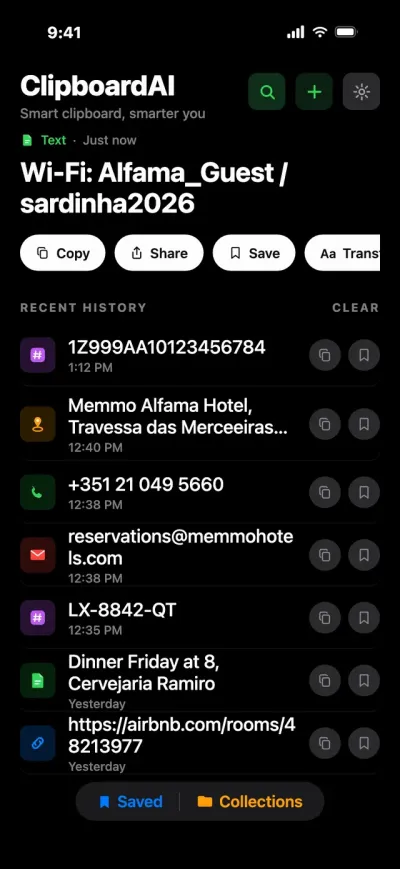
Everything you save, sorted on its own.

iOS never lets an app read your clipboard in the background, so saving takes one action: switch to the keyboard and your latest copy is saved as it opens. Or open the app, share to it, or press the Action Button.

  • Action Button, Back Tap or Siri. Run the Save Clip To ClipboardAI shortcut without opening the app.
  • Smart categories. Links, addresses, phone numbers, codes and images sort themselves on your iPhone.
  • Name your clips. Give a clip a custom name and find it by that name.
Searching your history →
03 · Text in screenshots · Free

It reads your screenshots.

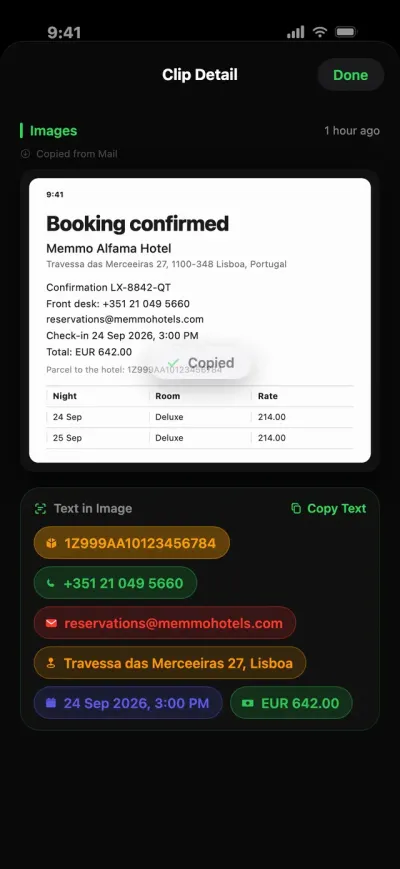
Save a screenshot of a booking and Clipboard AI pulls out the parts you need: the phone number, the email, the address, the date and the total. Tap a chip to copy it, call it or open it.

  • Read on your iPhone. Apple's Vision framework does the reading on device. No Apple Intelligence needed.
  • Tables come out as tables. Copy Table pastes real cells into Numbers, Sheets or Excel.
  • Searchable. Find a screenshot later by any word inside it.
Chips and tables in screenshots →
04 · Ask · Apple Intelligence

Forgot the words? Just ask.

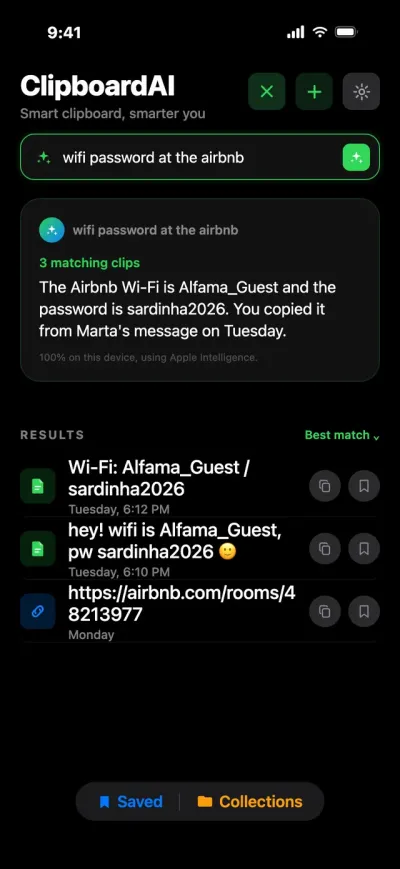
Type “wifi password at the airbnb” and Ask finds the clip and answers in a sentence, built only from things you actually copied. Ask is free on iPhone 15 Pro and newer with Apple Intelligence turned on.

  • Never made up. Every result is a real clip, and a question about something you never copied comes back empty.
  • Searches on your iPhone. A note under each answer says whether Apple's Private Cloud Compute helped write it.
  • Plain words work. “Hotels I copied for the trip” is a search.
Asking your clips →
05 · Rewrite · Pro

Make it sound just right.

Turn a rushed note into the message you meant to send. Summarize, Key Points, Proofread, Make Professional, Make Friendly and Shorten run on Apple Intelligence, and the result copies in one tap.

  • Your original stays. A rewrite never changes the clip it came from.
  • Nine text tools stay free. Change case, trim spaces, strip HTML and more.
  • Always labeled. Every result says whether it ran on your iPhone or on Apple's Private Cloud Compute.
Rewriting with Apple Intelligence →
06 · iPad and Mac · Pro

Copy on your Mac. Paste on your iPhone.

With Pro, your history, saved clips, names and Collections sync through your own private iCloud, up to 10x faster than a plain iCloud clipboard. On the Mac, press Command-Shift-V anywhere to search and paste.

  • Same Wi-Fi? Nearby devices hand clips to each other directly, without waiting on iCloud.
  • More than Universal Clipboard. Apple's passes only your latest copy, briefly. Sync keeps all of it.
  • One purchase. Pro covers iPhone, iPad and Mac.
Meet Clipboard AI for Mac →

The 30-second film

A whole trip, told by a clipboard.

A long weekend in Lisbon, and every detail someone copied along the way. Watch it go from Messages to a screenshot to the Mac without retyping a thing.

  1. Paste the hotel address from the keyboard
  2. Pull the details out of a booking screenshot
  3. Ask for the Wi-Fi password in plain words
  4. Rewrite a reply with Apple Intelligence
  5. Copy on the Mac, paste on the iPhone
Built in vs Clipboard AI

What iOS does on its own, and what it doesn't.

 
iPhone on its own
With Clipboard AI
Copies it keeps
One. The next copy replaces it.
Your last 10 free, unlimited with Pro
Paste something older
Not possible
One tap from the keyboard, in any app
Search what you copied
No history to search
Words, categories, link titles and screenshot text
Text in screenshots
Live Text, one image at a time
Read on device, searchable, tap-to-copy chips
Clips that never expire
No
Saved clips: 5 free, unlimited with Pro
On your Mac
Universal Clipboard: the latest copy, briefly
Your whole history on iPad and Mac with Pro
Privacy

Private by design. Clear about permissions.

Nothing sent to our servers

Sorting, search and text recognition run on your iPhone. Clipboard AI sends nothing to its own servers.

Codes stay covered

Verification codes and passwords show a padlock in the keyboard until you tap them.

Delete means delete

A deleted clip is erased at once, and auto-delete can clear old history for you.

Your data, your iCloud

With sync on, clips live in your own private iCloud database. Where your data lives.

Pricing

Free to start. Pro when you want more.

Free

$0
Free forever, no account needed
  • Your last 10 copies and 5 saved clips
  • The paste keyboard, in any app
  • Search, smart categories and clip names
  • Text in screenshots, read on device
  • Ask your clips, with Apple Intelligence
Download free
7 days free

Pro yearly

$19.99 / year
Try it free for 7 days
  • Unlimited history and saved clips
  • Sync with iPad and Mac, up to 10x faster than a plain iCloud clipboard
  • Collections for trips, projects and people
  • Apple Intelligence rewrites, on supported iPhones
  • Everything in Free
Start the free trial
Pay once

Lifetime

$34.99 once
Every Pro feature, no subscription
  • Everything in Pro, for good
  • One purchase for iPhone, iPad and Mac
  • No renewals to remember
Get Lifetime

Prices in US dollars. The App Store shows the price for your country.

Two-minute setup

How to set up a clipboard manager on your iPhone.

STEP 1

Get the app

Download Clipboard AI from the App Store. The same app runs on iPhone and iPad.

STEP 2

Add the keyboard

In Settings, go to General > Keyboard > Keyboards > Add New Keyboard and choose Clipboard AI, then tap it and turn on Allow Full Access. Step by step.

STEP 3

Copy, then press the globe

Copy anything, then switch to the Clipboard AI keyboard in any text field. It saves your copy and shows your clips. Pasting from the keyboard.

FAQ

iPhone clipboard questions, answered.

Does iPhone have a built-in clipboard history?+

No. iOS keeps one copied item at a time. iOS 27 added a paste suggestion above Apple's keyboard that previews that item, but there is no list of earlier copies. A clipboard manager like Clipboard AI keeps the history and pastes from it in any app.

Is Clipboard AI free on iPhone?+

Yes. The free plan keeps your last 10 copies and 5 saved clips, and the paste keyboard, search, smart categories and text recognition are free. Pro removes the limits and adds iCloud sync and Collections for $19.99 a year with a 7-day free trial, or $34.99 once for Lifetime.

Can Clipboard AI save everything I copy automatically?+

Not on iPhone, because iOS does not let any app read the clipboard in the background. Clipboard AI saves a copy when you switch to its keyboard, open the app, share to it, or run its shortcut from the Action Button, Back Tap or Siri. On the Mac it records copies automatically.

Why does the keyboard need Allow Full Access?+

Without Full Access, a keyboard can't read what you copy, so the Clipboard AI keyboard couldn't save your copies or paste them. Full Access also makes network access possible. Clipboard AI sends nothing to its own servers.

Does it work on iPad and Mac?+

Yes. The same app runs on iPad, and Clipboard AI for Mac opens with Command-Shift-V. With Pro, your history, saved clips, names and Collections sync across all three through your private iCloud.

Is it safe to keep passwords in a clipboard manager?+

It is better not to copy passwords at all, because AutoFill fills them without touching the clipboard. If a code or password does get saved, the Clipboard AI keyboard shows a padlock instead of its contents until you tap it, and iOS always uses Apple's own keyboard in password fields.

Your iPhone's clipboard, finally with a memory.

Free to start. The paste keyboard is free. One Pro purchase covers iPhone, iPad and Mac.

Download on theApp Store
QR code linking to Clipboard AI on the App StoreOn your computer?Scan with your iPhone camera to get the app.
4.9 from 78 ratings on the App Store