On this page
No. Google documents no clipboard history for Gboard on iPhone. Its official Gboard clipboard help article covers Android only and never mentions iOS, and the Gboard iOS App Store listing sells GIFs, emoji search, stickers, Glide Typing and Google Search with no clipboard feature anywhere in it. Microsoft's SwiftKey does document a clipboard on iOS, with published limits. Everything else you have read about Gboard on iPhone is inference.
That gap between what one vendor publishes and what the other does not is the whole story here, so let us take it in order.
The moment this question gets asked
Someone switches from a Pixel or a Galaxy to an iPhone. On Android they had a keyboard habit: copy three things in a row, open the keyboard's clipboard chip, tap whichever one they need. On iPhone the habit dies on day one. They install Gboard, because Gboard is what they used before, and they go looking for the clipboard icon that is not there.
Then they search, and the search results make it worse. Almost every page ranking for this question is written about Android and lets the iPhone reader draw their own conclusion. Some of them state item counts and expiry windows that Google has never published. One of the pages that surfaces for it is spam injected into a hacked university subdomain. This is a genuinely badly served question, which is why it is worth answering with sources rather than with confidence.
What each vendor actually documents
Disclosure: we make ClipboardAI, the last row of this table. Every other row is what the vendor's own documentation or App Store listing says, and nothing else.
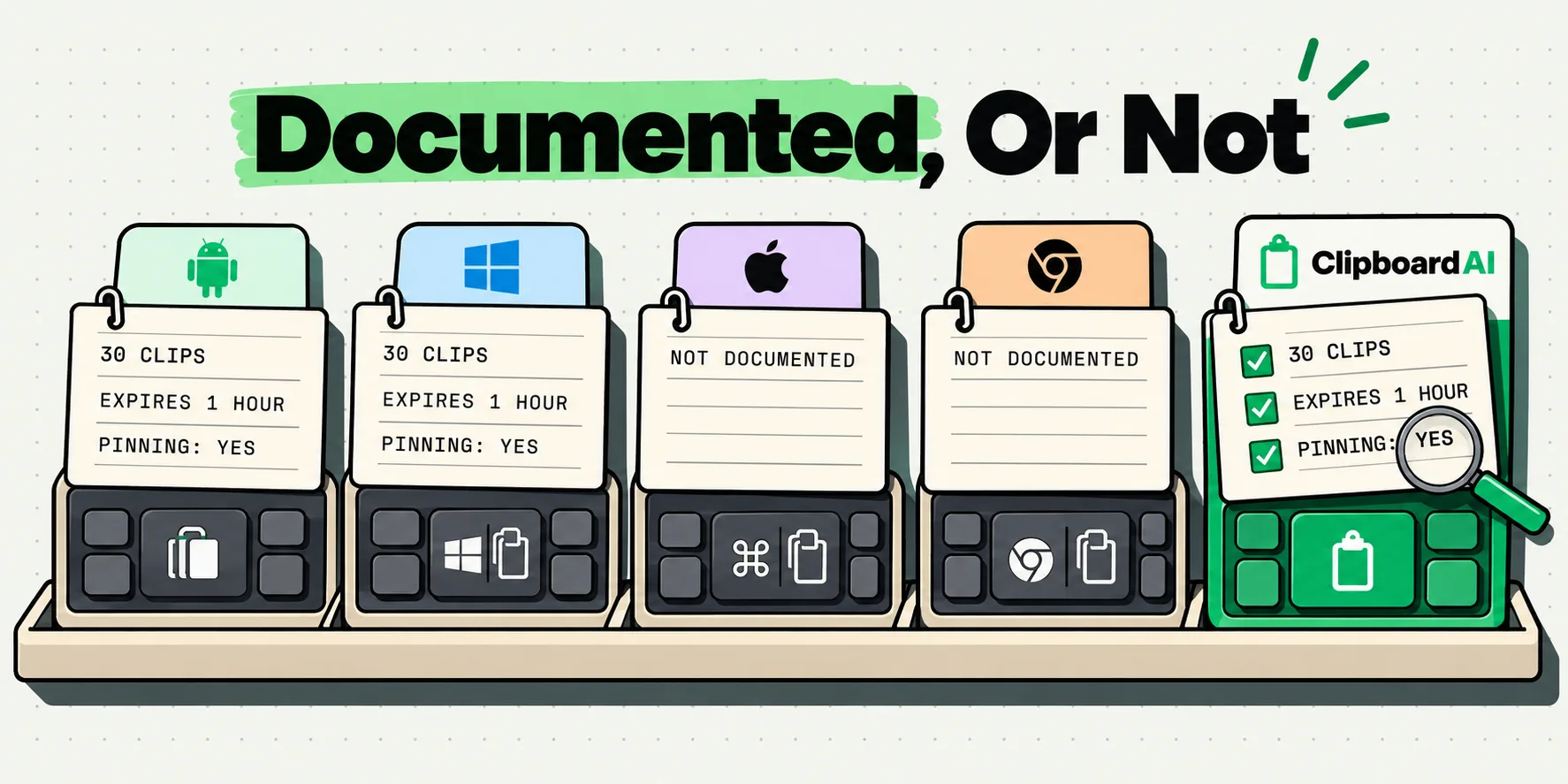
Here is the documented position for each keyboard people ask about, with the source in the final column:
Facts checked October 5, 2026, against Google Help, Microsoft Support and the US App Store.
| Keyboard | Clipboard history documented? | Items kept | How long | Pinning | Source |
|---|---|---|---|---|---|
| Gboard on Android | Yes | Not published by Google | Not published as a figure. Google says it "clears your history shortly after you last use it" | Yes. Google states the clearing "doesn't apply to pinned text" | Google's Gboard clipboard help article |
| Gboard on iPhone | No | Not applicable | Not applicable | Not applicable | Google's clipboard help article is Android only and never mentions iOS. The iOS App Store listing describes no clipboard feature |
| SwiftKey on iPhone | Yes | "The Clipboard can store a maximum of 30 clips" | "If you don't tap 'Save' your text will expire after 1 hour" | Yes, by tapping Save | Microsoft's SwiftKey clipboard support article |
| Apple's built-in iOS keyboard | No | Not applicable | The pasteboard holds what you last copied and is replaced when you copy again | Not applicable | Apple's UIPasteboard documentation |
| ClipboardAI keyboard (ours) | Yes | 200 clips cached in the keyboard, full history in the app | Until you delete it, or on an auto-delete schedule you set | Yes, "Saved" clips. Free tier caps saved clips at 5 | Our own app |
Note what SwiftKey's row does that Gboard's cannot: it carries real numbers, published by Microsoft, on a support page that separates its Android and iOS instructions with different tabs. Thirty clips, one thousand characters each, one hour before an unsaved clip expires, reachable from the Toolbar icon or from Settings and then Clipboard inside the SwiftKey app. Whether or not you like SwiftKey, that is how a vendor should document a feature.
About the "1 hour" figure you have seen attached to Gboard
You will find a one-hour retention window quoted for Gboard all over the web, usually with no source. It does not come from Google's documentation. Google publishes no item count and no time figure for Gboard's clipboard on any platform. The one-hour wording that people are repeating comes from a message shown inside the Gboard app itself, which is a different thing from a documented commitment and can change in any release.
If you want to state something about Gboard's Android clipboard and be right, the safe sentence is Google's own: the clipboard clears your history shortly after you last use it, and that does not apply to pinned text. Everything more specific than that is somebody's observation, not Google's promise.
There is no evidence Google removed a clipboard from Gboard for iOS. The likelier explanation is the platform: Android exposes a system clipboard service that a keyboard can read directly, while on iOS reading the pasteboard from a keyboard extension requires the user to enable Allow Full Access first. That is a design constraint, not a slight.
The free 60-second thing to try first
Before installing anything, know what iOS already gives you. Apple documents the general pasteboard as persistent across device restarts and app uninstalls, which surprises most people. It survives a reboot. What it does not do is stack: copy something new and the previous item is gone, and Apple documents no history list and no automatic expiry.
Across devices, Apple gives you Universal Clipboard for free. Copy on one device, paste on another, provided they are within 30 feet (10 meters) of each other, signed into the same Apple Account, with Bluetooth, Wi-Fi and Handoff on. Apple has never published how long a copy stays available and says only that it "remains there briefly". That covers the Mac-to-phone case on the same desk and nothing further. We wrote about the boundary in why Universal Clipboard stops working.
If SwiftKey is already on your phone
SwiftKey is a good keyboard, and Microsoft documenting its clipboard with real numbers is more than most vendors manage. For holding three or four short bits of text over the next few minutes it costs nothing and does the job. The published limits are where the friction starts: one thousand characters per clip rules out pasted paragraphs, code blocks and long URLs with tracking tails, the iOS page describes text clips rather than images, and unsaved text is gone in an hour. The moment you want something you copied yesterday morning, that is the line you cross.
The separate question of what any third-party keyboard can see is worth understanding rather than worrying about. Apple's App Extension Programming Guide is explicit that when you tap into a secure text input field, the system replaces your custom keyboard with Apple's own, and restores yours when you tap a normal field again. That applies to every third-party keyboard equally. We go through the full capability list in our roundup of iPhone keyboard apps.
Getting an Android-style clipboard on iPhone
What Android switchers are actually missing is not Gboard. It is a keyboard that shows recent clips inside whatever app you are typing in. On iOS that means a clipboard app with a keyboard extension, because the keyboard is the only surface a third-party app can present inside somebody else's text field.
Ours does exactly that, and the keyboard extension is free rather than a Pro feature. Turn it on once, switch to it with the globe key, and tap a clip to drop it into the field you are already in. Filter chips narrow the list to All, Saved, Images, Collection or Category, so the address you copied twenty minutes ago is two taps away inside Messages, Mail, WhatsApp or anywhere else you type. The keyboard keeps the 200 most recent clips ready, with the full history in the app, and the magnifier jumps you there when you want to search the lot. Enabling the keyboard takes about a minute, and the paste keyboard page shows it in use. Images are in there too: tap one and it lands on the pasteboard with a Copied toast, ready to paste into the thread.
Getting clips into it is a gesture you set up once. Copy something, double-tap the back of your iPhone, and Back Tap saves it. No app opens, nothing flashes, you stay in the message you were reading. If your iPhone has an Action Button, one press of it saves the clip instead. The keyboard itself saves what you copied while you are typing, so much of the time there is no extra step at all, and on a Mac it is completely hands off: every copy is captured automatically and continuously. Accessing clipboard history on iPhone walks through each route.
The free tier holds 10 clips with 5 saved, which is enough to live in for a week before you decide. Pro lifts the ceiling and turns on iCloud sync, so a copy made on the Mac is in the keyboard on your phone. Full Access is Apple's requirement for any keyboard that reads the pasteboard, and ours makes no network requests of any kind, which is worth reading about before you grant it to anything. Get it set up and the Android habit is back: copy three things in a row, then place each one exactly where it belongs without leaving the app.
The short version
Gboard on iPhone has no documented clipboard history and its listing does not claim one. SwiftKey on iPhone does, capped at 30 clips of 1,000 characters, with unsaved text expiring after an hour. Apple's own keyboard offers none. If you want the Android habit back in full, with images, longer clips and history that is still there tomorrow, that needs a dedicated clipboard app with a keyboard extension. There are several, ours among them, and its keyboard is free: copy three things in a row, then put each one exactly where it belongs without leaving the app you are in.
Frequently Asked Questions
Does Gboard on iPhone have an Android-style clipboard?
No. Google's official Gboard clipboard help article is written for Android and does not mention iPhone or iOS anywhere, and the Gboard iOS App Store listing describes GIFs, emoji search, stickers, Glide Typing and Google Search with no clipboard feature. Checked October 5, 2026. If you moved from Android and are hunting for the clipboard chip you used to tap, it is not part of the iOS version.
How long does Gboard keep clipboard items on Android?
Google does not publish a number. Its help article says only that the clipboard clears your history shortly after you last use it, and that this does not apply to pinned text. The one-hour figure repeated across the web is not from Google's documentation. It comes from a message shown inside the Gboard app, which can change in any release, so treat it as an observation rather than a commitment.
Does SwiftKey give you clipboard history on iPhone?
Yes, and Microsoft documents it with actual numbers. Its support page states the clipboard can store a maximum of 30 clips, each limited to 1,000 characters in length, reachable from the Toolbar icon or from Settings and then Clipboard in the SwiftKey app. Unsaved text expires after one hour unless you tap Save. That makes SwiftKey the best-documented built-in keyboard clipboard on iOS as of October 5, 2026.
Why does iPhone not have a built-in clipboard history?
Apple documents the general pasteboard as persistent across device restarts and app uninstalls, but it is a single carrier rather than a list: copying something new replaces what was there, and Apple documents no history and no automatic expiry. Nothing in iOS surfaces past copies. Any longer history you see on an iPhone exists because an app saved copies into its own storage, which is what clipboard managers do.
How do I get an Android-style keyboard clipboard on iOS?
Install a clipboard app that ships a keyboard extension, since the keyboard is the only surface a third-party app can present inside another app's text field on iOS. Options include ClipboardAI, Paste, PastePal, Clippo and OneTap. Reading the system clipboard from a keyboard requires you to enable Allow Full Access, which is Apple's rule for every keyboard rather than a per-app decision.