On this page
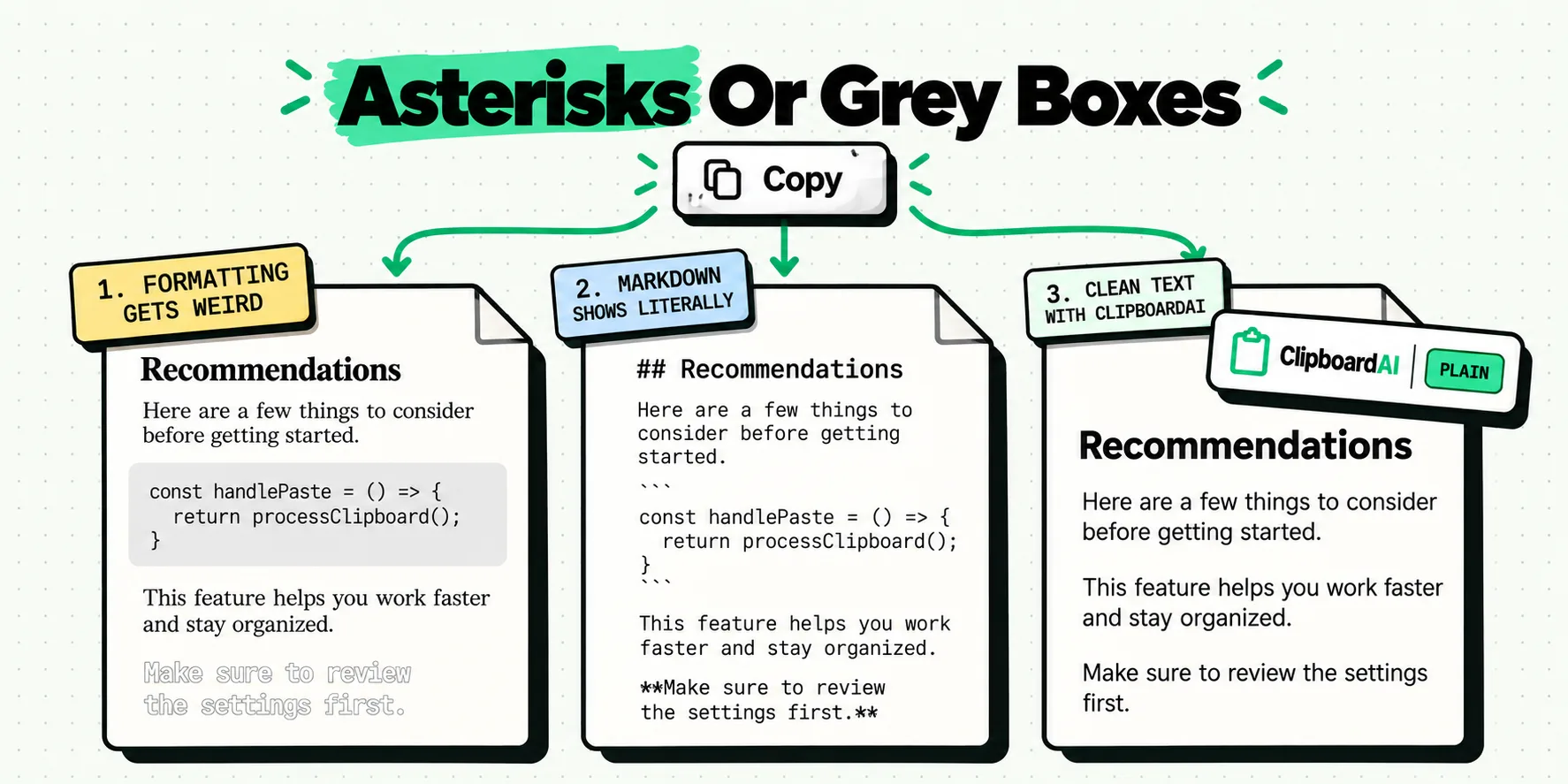
Copying an answer out of ChatGPT or Claude produces two different problems that people report as one complaint. Paste as rich text and you drag the chat window's gray code boxes, its font and its text color into your document. Paste as plain text and all of that disappears, but the markdown syntax stays visible as literal asterisks and hashes. Choose plain text when you want clean prose, and a markdown-aware destination when you want real headings and bold.
Those are opposite fixes, which is why the advice you find is contradictory. Working out which problem you have takes about five seconds once you know what to look at.
The two failures look nothing alike
The first one arrives looking wrong. You paste an explanation into a Google Doc and three paragraphs come in at 13px in a font you have never used, with one section sitting inside a gray rounded rectangle because the model wrapped it in a code fence. Worse, in a Gmail reply the pasted text can land white on white, invisible until you select it, because the copied styling carried a light text color that made sense against a dark chat interface and makes none against a white compose window.
The second one arrives looking naked. The formatting is gone, which is what you wanted, but now every heading reads ## Recommendations and every emphasized term is wrapped in a pair of asterisks. Nothing is broken. You are simply looking at markdown source in an application that has no idea what markdown is.
What is actually sitting on the clipboard
A single copy operation puts several representations of the same content on the pasteboard at once, and the receiving app picks whichever one it prefers. A web page hands over HTML with all its styling attached, plus a plain-text fallback. When you paste into a rich-text destination it takes the HTML, styling included. When you paste into a plain-text destination it takes the fallback.
Markdown syntax is a separate matter entirely. It lives in the text characters themselves, not in the styling layer, so no amount of formatting removal touches it. If the copy you took was the raw markdown source rather than the rendered output, the asterisks were always going to travel with it. This is the mechanism behind the most persistent misconception in this whole topic, so it is worth stating once more in plain terms: stripping formatting is subtractive and can never create bold text that did not already exist as bold text.
A 60-second fix that costs nothing
On a Mac, the command already exists and most people never use it. In almost every native app the Edit menu carries Paste and Match Style, bound to Option-Shift-Command-V. It discards the incoming styling and adopts whatever the cursor is already sitting in. That handles the gray boxes, the wrong font and the white-on-white case in one keystroke, with nothing installed.
On an iPhone there is no equivalent system command. The free workaround is to launder the text through a single-line field: paste into Safari's address bar or any search box, select all, copy again, then paste for real. A single-line field stores characters and nothing else, so the styling cannot survive the round trip. It is clumsy, it works every time, and it costs nothing.
Want real headings, bold and tables instead of bare text? Our free AI paste fixer converts the answer for Word, Google Docs or Gmail, right in your browser.
Decision tree: which of the four outcomes do you want?
Before pasting, decide which of these four you are actually after. The right action follows from the answer, and picking the wrong one is why people paste the same block four times in a row.
- Keep the rich text as it is. You want the model's table or code block to stay visually structured, and the destination's own theme does not matter. Paste normally. Accept that fonts and background fills come too.
- Strip everything to plain text. You want the words in your document's own styling. Use the match-style paste for that app. Any markdown characters in the source will remain visible.
- Keep markdown as markdown. You are pasting into a file, a repository, a static site or a note that will be rendered later. Paste plain and leave the syntax alone. It is not clutter, it is the format.
- Turn markdown into real formatting. Paste into an editor that parses markdown on paste, then copy out of that editor as rich text into your final destination. No clipboard tool performs this conversion for you.
If you want outcome 4 and you are on a Mac, the shortest reliable path is a two-hop paste: raw markdown into a markdown editor, then rich text out of it into Word or Gmail. Two pastes, but no manual re-styling.
Paste-plain shortcuts by destination
The command that discards incoming styling is named differently in almost every application, which is a large part of why people give up and retype. These are the macOS bindings, checked July 2026. On iPhone and iPad, none of these exist and the single-line-field trick above is the fallback.
| Destination | Command name | macOS shortcut | Does it parse markdown? |
|---|---|---|---|
| Pages, Notes, Mail, TextEdit | Paste and Match Style | Option-Shift-Command-V | No |
| Google Docs (browser) | Paste without formatting | Shift-Command-V | No |
| Gmail (browser) | Paste without formatting | Shift-Command-V | No |
| Microsoft Word | Paste Special, Unformatted Text | Control-Command-V opens the dialog | No |
| Slack | Paste as plain text | Shift-Command-V | Partially, on send |
| Notion | Paste as plain text | Shift-Command-V | Yes, on a normal paste |
| Obsidian, Bear, iA Writer | Not needed | Command-V | Yes, natively |
Two rows on that table are the ones worth memorizing. Notion is the reason people think a clipboard tool converts markdown: paste raw markdown into Notion with a plain Command-V and it becomes real headings and bullets, because Notion parses it. Word is the reason people think the whole thing is impossible: it has no single-key plain paste, only a dialog.
One checkbox for clean pastes, and the answer still there tomorrow
The styling half of this becomes a setting you make once. On the Mac, turn on Always paste as plain text, in Settings under General in the Behavior group, and every paste you make through ClipboardAI arrives in your document's own font: no gray code-block fill, no 13px mystery typeface, no white-on-white text in a Gmail reply. Hold Option when you want one rich paste back, without switching the preference off and on again. The plain-text paste guide walks through both directions, and the Mac shortcut reference covers the other paste modifiers alongside it.
The other half is the one you notice a week in. Model output is long, you use it in pieces, and the system clipboard holds exactly one item. ClipboardAI keeps the whole answer after you have copied three other things on top of it, so the second and third use never mean going back to regenerate anything. The paste keyboard drops a saved answer into any text field on the phone, and pinning a clip holds it near the top while the day's other copies pile up underneath. There is more on that pattern in our piece on running a chat assistant with a clipboard manager.
Then there is the case neither of those covers: text that shows up with the tags still in it. Copy from a source that hands you page markup rather than words and your paragraph arrives carrying literal <p> and <strong>. Open the clip, tap Transform Text, tap Strip HTML, and the tags go while the words they wrapped stay put. It sits in a list of nine transforms that are free on iPhone and Mac, none of them Pro, next to Trim Whitespace for the stray indentation a copied code block drags along and Remove Line Breaks for an answer that came across snapped every forty characters. The screen previews the result before you tap Copy Transformed Text, so nothing is a guess.
One thing to keep straight, because it catches everybody: stripping styling is subtractive, in our app and in every other one. A block of text containing double asterisks stays a block of text containing double asterisks. When you want those asterisks to become real bold, that is outcome 4 above, the two-hop paste through a markdown editor. Strip HTML is no exception to that rule. It removes markup that is in your way, it does not read markdown syntax and build formatting from it. Similar-sounding names, opposite directions.
Put together, the day looks like this. The model writes something good, you save it once, and it goes into the doc, the email and the ticket in your own formatting, three times, without a single trip back to the chat window.
Three cases where the destination overrules you
Some destinations ignore your choice entirely. A rich-text field in a web app may run its own paste handler in JavaScript, sanitizing or re-styling whatever you give it regardless of which paste command you used. If the same block behaves differently in the browser than it does in a desktop app, that handler is the reason, and you cannot override it from the clipboard side.
Code blocks are their own case. Copying code out of a chat window often brings a trailing newline, non-breaking spaces where the interface rendered indentation, or curly quotes where you needed straight ones. Plain paste removes the gray background but not the characters. Paste into an editor and check the whitespace before you run anything.
And if the model's answer is genuinely structured, tables and nested lists, then plain text will flatten it and no shortcut recovers the structure. That is a case for outcome 1 or outcome 4, not for stripping. Our companion article on what survives a paste between apps covers which pairs of apps preserve which attributes, which is the same underlying question from a different angle.
Frequently Asked Questions
Why does ChatGPT text paste with asterisks in it?
Because the model writes markdown and the copy you took was already plain text. In markdown, two asterisks around a word mean bold and a hash at the start of a line means heading. The chat window renders that into visible styling on screen, but if what lands on your clipboard is the raw source rather than the rendered version, the syntax characters come along literally. Pasting into a markdown-aware editor renders them. Pasting into Gmail or Word does not.
Does pasting as plain text turn double asterisks into bold?
No, and this is the single most common misunderstanding. Stripping formatting is a subtractive operation. It removes fonts, colors, backgrounds and link styling from text that already had them. It cannot add styling that was never there. If you paste plain text containing two asterisks around a word, you get two asterisks around a word. Converting markdown into real headings and bold needs a converter or an editor that parses markdown on paste, not a plain-text paste.
How do I paste plain text on an iPhone?
iOS has no system-wide paste-as-plain-text command, so the reliable free workaround is to launder the text through a single-line field. Paste into Safari's address bar or a search box, select all, copy again, then paste where you actually wanted it. Single-line fields hold characters and nothing else, so styling cannot survive the round trip. On the Mac it is one checkbox instead: switch on ClipboardAI's Always paste as plain text and anything you paste out of its panel lands clean, in whichever app you are in.
How do I stop pasted text bringing a background color with it?
The background color is part of the copied rich text, usually a code block's gray fill or the chat interface's own theme. Any paste that preserves formatting will preserve it. Paste with the match-style command for your app and the fill disappears along with the font. The related trap is text that pastes white on a white background, which happens when the source styling specified a light text color against a dark interface. The same fix applies.
What does Strip HTML do, and is it the same as converting markdown?
They are two different jobs. Strip HTML takes text that literally contains tags, the angle-bracket kind you get when a source hands you page source instead of words, and gives you back the words with the markup deleted. Markdown conversion goes the other way: it reads asterisks and hashes and builds real bold and headings out of them. ClipboardAI does the first one in a tap, free on iPhone and Mac, from Transform Text on any clip. It does not do the second, and neither does any other clipboard tool, so that one still means a paste through a markdown editor.
Which apps understand markdown when you paste it?
Editors built on markdown handle it natively, so pasted syntax becomes real structure: Obsidian, Bear, iA Writer and anything writing to a markdown file. Notion converts markdown into its own blocks on paste. Slack and Discord interpret a subset. Word, Pages, Gmail and Apple Mail do not parse markdown at all and will show the raw characters. Check with a single bold word before you paste two thousand of them.