On this page
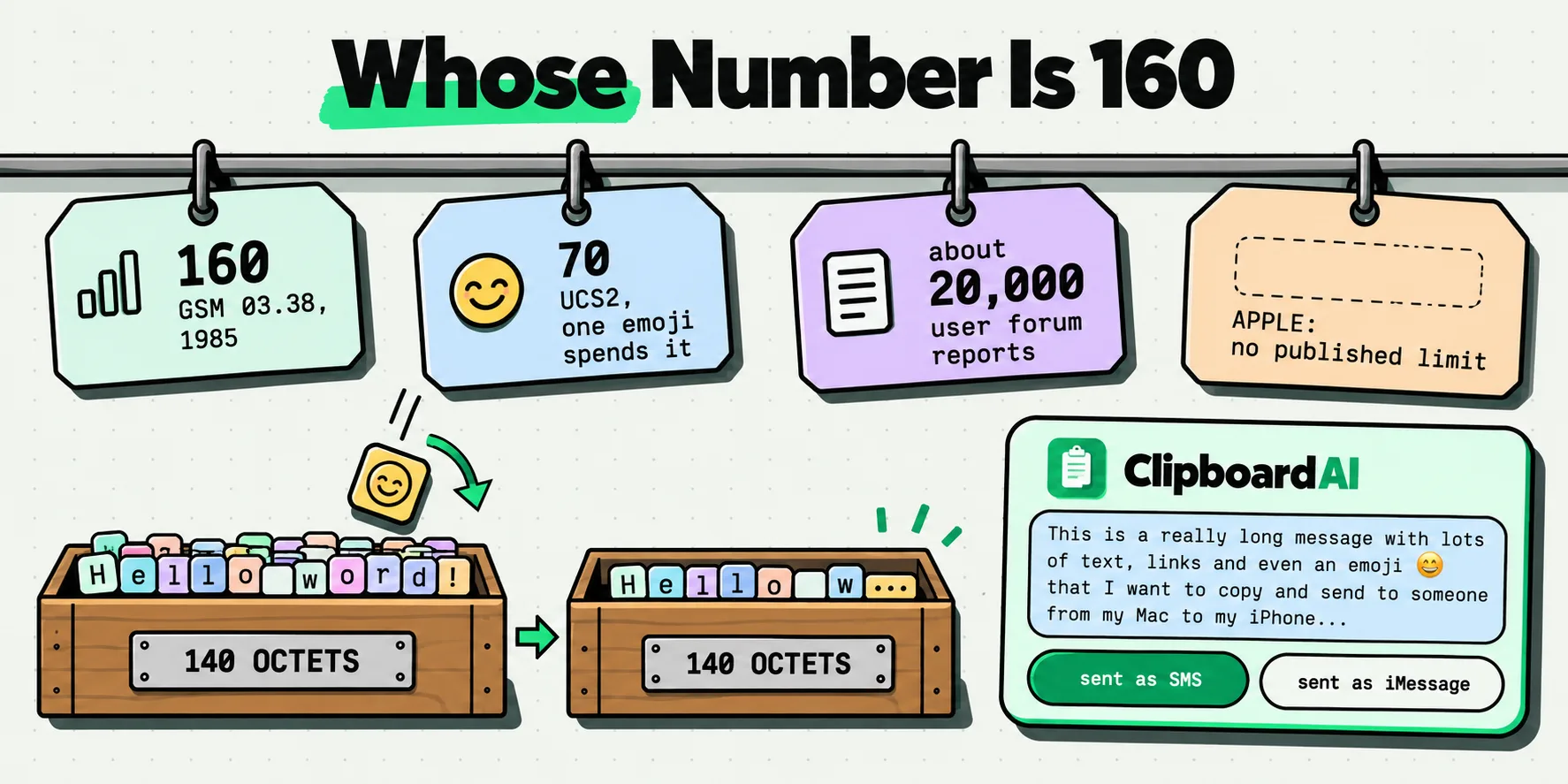
Apple publishes no character limit for iMessage. Its Messages documentation covers sending, replying, Tapbacks, and the difference between iMessage, RCS and SMS, and none of it states a length, a split threshold or a point at which a message fails. The famous 160 is not Apple's number at all. It belongs to the GSM short message standard, applies only when your message leaves as SMS, and the roughly 20,000 figure circulating online comes from user reports on Apple's own forums.
Three different numbers are involved in this question and almost every page that answers it merges them. Here they are separated, each traced to the document it came from.
160 belongs to a telecoms standard from 1985
Open 3GPP TS 23.038, "Alphabets and language-specific information", the specification that started life as GSM recommendation 03.38. Clause 4, on the SMS data coding scheme, says this about the GSM 7-bit default alphabet:
"When this character set is used, the characters of the message are packed in octets as shown in clause 6.1.2.1.1, and the message can consist of up to 160 characters."
Clause 6.1.2.1.1 then explains where 160 comes from, and it is arithmetic rather than a design decision about how much people want to type: "in 140 octets, it is possible to pack (140x8)/7=160 characters." The real constraint is a 140-octet payload field. Squeeze seven-bit characters into it and 160 fit.
The same clause gives the number nobody quotes. Use anything outside that 7-bit alphabet, which includes every emoji, plus Greek, Cyrillic, Arabic, Hebrew, Thai and all CJK text, and the message switches to UCS2: "the message can consist of up to 140 octets, i.e. up to 70 UCS2 characters." One emoji and your 160 becomes 70.
None of this is Apple's. It is a carrier-network standard that predates the iPhone by more than two decades, and Apple's own page on message types describes SMS and MMS in exactly those terms: "SMS and MMS are carrier-provided services."
Every number in circulation, and where it actually comes from
This is the ledger. Everything in the "primary source" column was read directly, not quoted from a summary. Last checked 29 July 2026.
| Figure | Whose standard or product | Primary source | What it actually governs |
|---|---|---|---|
| 160 | GSM, now 3GPP | TS 23.038 clause 4 | One SMS in the GSM 7-bit default alphabet. Nothing to do with iMessage. |
| 140 octets | GSM, now 3GPP | TS 23.038 clause 4 | The actual payload field. 160 is simply what 140 octets holds at seven bits per character. |
| 70 | GSM, now 3GPP | TS 23.038 clause 4 | One SMS once the message contains any character outside the 7-bit alphabet, emoji included. |
| 153 | GSM, now 3GPP | TS 23.040 clause 9.2.3.24.1 | One segment of a multi-part SMS: "the maximum length of the short message within the TP-UD field is 153 (160-7) characters". Seven characters go to the header that lets segments be reassembled. |
| 67 | GSM, now 3GPP | TS 23.040 clause 9.2.3.24.1 | One segment of a multi-part SMS in UCS2, given verbatim as "67 ((140-6)/2)". |
| 39,015 | GSM, now 3GPP | TS 23.040 clause 9.2.3.24.1 | The maximum length of an uncompressed concatenated SMS, "39015 (255*153) default alphabet characters". A real ceiling, and still not iMessage's. |
| 17,085 | GSM, now 3GPP | TS 23.040 clause 9.2.3.24.1 | The same ceiling in UCS2, "17085 (255*67) UCS2 characters". Notice how close this sits to the folk figure two rows down. |
| No figure | Apple | Three Messages pages, read end to end | iMessage. No length, no split point, no stated failure threshold anywhere. |
| About 20,000 | Nobody | Apple Community threads 8426396 and 7898324 | A user report. One reply on thread 8426396 puts it as "no official character limit, although some users have received error messages when approaching 20,000 characters". |
| 4,000 | Nobody | The same Apple Community threads | A different user's figure in the same discussion, which is the tell. Two user reports that disagree by a factor of five are not a specification. |
| Carrier-set | Your carrier | Apple support article 104972 | MMS attachment size. Apple calls SMS and MMS "carrier-provided services" and publishes no size of its own. |
| Not published | Apple | Apple support article 104972, RCS section | RCS message size. The page describes what RCS can carry and never gives a length. |
Two things fall out of reading that column downwards. Every genuinely documented number belongs to the GSM family of standards. And the one number people most want, the iMessage number, is the one nobody has ever written down.
The pages Apple does publish, and what is in them
For the avoidance of doubt about the absence, these are the pages checked on 29 July 2026 and what each contains.
- "Send and reply to messages on iPhone" in the iPhone User Guide. Sections: start a conversation, reply to a message, reply inline to a specific message, reply from the Lock Screen, send from your other number, and "Why are some bubbles blue and others green?". No length appears anywhere. The only failure it describes is generic: "If a message can't be sent, an alert appears. Tap to try sending the message again."
- "Set up Messages on iPhone". Turning on iMessage, Messages in iCloud, Text Message Forwarding, satellite messaging. No limits of any kind.
- "What is the difference between iMessage, RCS, and SMS/MMS?", support article 104972, published 11 May 2026. It defines all three transports and their encryption status. It gives no character count for any of them.
There is a Character Count switch in the Messages settings, and it is worth knowing what it counts. It displays your typing against 160, which tells you exactly which standard it belongs to. Apple's Messages settings documentation does not describe the option at all, so every instruction you will find for it is third-party.
What actually happens when a message is too long
Because there is no published number, the practical question is not "what is the limit" but "what does this specific conversation do". That varies by transport, and the difference is visible in the bubble color.
| Where you are sending | What sets the ceiling | What you see when it is too long | What to do |
|---|---|---|---|
| Blue bubble to blue bubble | Nothing Apple publishes. User reports cluster loosely around 20,000 characters. | Usually nothing at all. When it does break, it is a send failure with a retry, not a silent trim. | Send it, and if it fails, split it yourself at a paragraph break. |
| Blue to green, falling back to SMS | The GSM standard: 160 per segment, 153 per segment once it concatenates. | The message goes through as several texts, and your carrier bills accordingly. | Check the Character Count display before sending anything long over SMS. |
| Blue to green over RCS | Your carrier's RCS implementation. Apple publishes nothing. | Varies by carrier, which is why nobody can give you a number for this. | Treat it as unpredictable and keep long messages short of a few thousand characters. |
| Group iMessage | The same unpublished iMessage behavior, applied per message. | One participant on a green bubble can drag the whole thread to SMS rules. | Check the send button color, not the group name. |
| Messages on Mac | Identical to iPhone. Same account, same service. | The same failure, except you are more likely to have pasted something enormous. | This is where a 40,000-character paste usually originates. |
| iPad | Identical again. | Same as iPhone. | Nothing different. |
| Apple Watch | The service is the same, the composition method is not. | Long text is a dictation and scribble problem before it is a limit problem. | Compose long messages elsewhere. |
| A message full of emoji, over SMS | UCS2 encoding: 70 characters per segment, 67 when concatenated. | Your 160-character text becomes several segments the moment one emoji lands in it. | Strip the emoji, or accept the extra segments. On iMessage this does not apply. |
The row that catches people is the second one. A long message typed in a blue conversation behaves one way, and the identical message sent to an Android phone falls under a 1985 telecoms standard, gets chopped into 153-character pieces, and can arrive out of order on an old handset. Same app, same typing, entirely different rules.
The quick win: check the bubble, not the count
Before sending anything long, look at the send button. Blue means iMessage and effectively no practical ceiling for normal writing. Green means the rules above. That single glance answers the question better than any number, and costs nothing.
If you are about to send something genuinely large, a recipe, a set of directions, a chunk of an email thread, break it at a paragraph. Not because 20,000 is a real threshold, but because a message that fails at send is a message you have to reconstruct, and reconstructing text you have already lost is the actual cost here.
Keeping the message when the send fails
Which brings up the part of this that bites hardest, and it has nothing to do with limits. You paste a long block into Messages, the send fails, you tap out of the conversation, and the draft is gone. The source is gone too, because you copied something else in between.
With a clipboard history, that copy is still there. Everything you copy on a Mac is captured the moment it lands on the pasteboard, automatically and continuously, with no gesture at all. On iPhone it is one gesture: set up Back Tap once in iOS Settings, and from then on a double-tap on the back of the phone saves whatever you just copied. No app opens, nothing flashes, you stay exactly where you are in Messages. On an iPhone 15 Pro or later the Action Button does the same in a single press. A failed send stops being a retyping job and becomes a re-paste.
There is a second, more mundane use. Text lifted out of a PDF or a web page arrives carrying a hard line break at the end of every visual line and a scattering of double spaces, and all of that counts against an SMS segment. Remove Line Breaks and Trim Whitespace are two of nine free transforms on both iPhone and Mac, they take one tap, and on hard-wrapped text they measurably shorten what you are about to send. The transform reference lists all nine, and why pasted text loses its line breaks on iPhone covers the underlying mess.
Inside the Messages composer, the ClipboardAI keyboard is the fast route: switch to it while your cursor is already in the thread and tap the clip, and the characters are inserted where you are typing, without leaving the conversation, which is also the move that makes sending the same message to twelve people individually bearable, one tap per thread instead of twelve retypes. Using the clipboard keyboard on iPhone walks through the setup.
One boundary, stated plainly: we do not split a message into sendable parts. There is no chunking, no character-count splitter, no regex. What you get is that the long text survives the failure and is still there, in full, on both your devices, to paste again in whatever pieces you decide on.
The better version of the evening is small. You paste the whole itinerary, it fails, you send it in two halves from the same clip, and nothing was retyped.
Why nobody can give you the real iMessage number
It is worth being clear about why the absence is likely permanent rather than an oversight.
- iMessage is Apple's own service, not a carrier standard. SMS has a published limit because independent networks have to interoperate byte for byte. iMessage talks only to Apple, so no number has to be agreed with anyone, and none has to be frozen.
- Anything Apple published would immediately be wrong somewhere. Message length interacts with encoding, attachments, effects and per-message overhead. A single figure would be a simplification that generated more support contacts than it answered.
- The user reports are self-inconsistent, which is what you would expect. The same forum thread carries 20,000 and 4,000. Those are not competing measurements of one constant. They are people hitting different conditions.
- The number people actually want is smaller than any of them. Almost nobody is asking whether 19,000 characters will send. They are asking why a long message split into pieces, and the answer to that is the bubble color, which is documented.
If you want the same story about a limit everyone quotes and nobody sourced, the 2,048-character URL limit traces back to a constant in a discontinued browser's networking library, and the iPhone clipboard size limit turns out to belong to a third-party keyboard rather than to Apple. For the related and much more common problem of getting several messages out of a thread intact, there is copying a whole text conversation on iPhone.
Frequently Asked Questions
What is the character limit for iMessage?
Apple has never published one. Its Messages user guide pages and its support article on the difference between iMessage, RCS and SMS all describe how the service works and state no length, no split threshold and no failure point. Community reports of a limit around 20,000 characters come from users on Apple's forums, not from Apple, and the same threads also contain a figure of 4,000, which tells you how firm they are.
Why do people say text messages are limited to 160 characters?
Because SMS genuinely is. The GSM standard, now 3GPP TS 23.038, states that a message in the GSM 7-bit default alphabet "can consist of up to 160 characters", and explains that this comes from packing seven-bit characters into a 140-octet field. It is a carrier-network standard that predates the iPhone by decades. It applies to your iPhone only when a message goes out as SMS, which is when the bubble is green.
Does iMessage split long messages into multiple texts?
Not the way SMS does. Splitting is an SMS mechanism defined in 3GPP TS 23.040, where each segment carries 153 characters instead of 160 because seven characters go to a header that lets the pieces be reassembled. A blue-bubble iMessage is a single message on Apple's own service, and Apple documents no segmentation for it. If your long message arrived in pieces, it went out as SMS.
Why does one emoji shorten my text message so much?
Because any character outside the GSM 7-bit alphabet forces the whole message into UCS2 encoding, and the standard is explicit about the cost: the message can then consist of "up to 140 octets, i.e. up to 70 UCS2 characters". A single emoji halves your allowance for the entire message. This applies to SMS only, so it affects green bubbles and not blue ones.
Is there a limit on how much text I can paste into Messages?
Apple documents no paste-specific limit, and pasting behaves like typing as far as the service is concerned. The practical risk is not the paste but the failure afterwards: if a very long message will not send and you navigate away, the draft goes and so does the original, because you have since copied something else. A clipboard history removes that failure mode entirely by keeping the copy.
What is the longest message SMS can actually carry?
3GPP TS 23.040 gives it exactly: "The maximum length of an uncompressed concatenated short message is 39015 (255*153) default alphabet characters, 34170 (255*134) octets or 17085 (255*67) UCS2 characters." That is 255 segments, the most a concatenation header can reference. It is a real published ceiling, it belongs to SMS rather than to iMessage, and no carrier or handset will happily send you 255 segments.